Saturday, July 15, 2006

Extremely Busy


I'm very very busy these days..

I even don't have any time for blogging anymore..

But i'll try to post some articles when possible..
In fact, i'm preparing right now 2 interesting articles about:
- [Internet Censorship]
- [Insecurity of the Internet's Communications Routing (Infrastructure-Systems)]

Well, what keeps me busy alot is that i'm beginning a massive upgrade in my mind knowledge-base.. i'm reading 4 books for now and preparing for the 5th..

1. Pragmatic Ajax - A Web 2.0 Primer
2. Wrox - Beginning PHP, Apache, MySQL Web Development
3. Wrox - Professional PHP Programming
4. Yacoubian Building

5. The Da Vinci Code
[(for 4 & 5) can anyone provide me with the movies, or at least a web link to download them?]

Sure thing not all of them r code.. or i'd kill myself.. there should be some fun, some art..

Alot of freelance work will begin soon.. i won the bidding on a new and BIG 2 projects.. i'll start coding them next Saturday July 22, 2006.. 1000s of lines of self-learning code will be written..

So, reading-coding, coding-reading.. this is what i'll be seen doing the next period.. God help me..

See u soon! :'(

<.adjuster />

Tuesday, July 04, 2006

GahooYoogle

Like Google? Like Yahoo?
No problem
Try the power of Yahoo & Google combined in one place..

Why to use GahooYoogle?
Save your time, get more results in less time.
Your search will be faster and more reliable.

How to remember the name and spelling of GahooYoogle?
A little "poem", you will never forget GahooYoogle:
Write Yahoo then Google
Make the Y and G Toggle
Never forget GahooYoogle

http://www.gahooyoogle.com/

Enjoy Using GahooYoogle Experience!

<.adjuster />

Monday, June 19, 2006

Google Machine Translation System

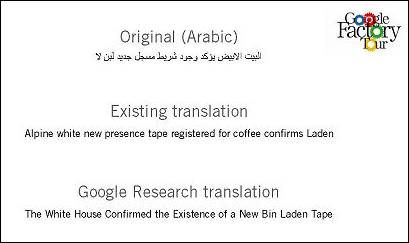
Google gave journalists a glimpse of its next generation machine translation system at a May 19th Google Factory Tour. The system has been trained using the United Nations Documents as a corpus. This corpus is some 200 billion words worth of content. It uses existing source and target language translations (done by human translators at the U.N.) to find patterns it then uses to build rules for translating between those languages. Apparently it was successful where the current version had failed in translating certain phrases. If anyone were capable of making a serious go of MT, that would have to be Google..

Google has improved the algorithms for its MT program by feeding its computers the equivalent of 1 million books of text, using sources such as parallel translations of United Nations documents..

The results were very impressive, not the stupid machine translation you see on the Internet, which isn't really good..

Today, nearly every translation service offered on the Web - AOL, Alta Vista, Babblefish, even Google's - is powered by translation technology developed by Systran. The company, based in San Diego and Paris, has been involved in MT for more than 30 years. Each day, it translates more than 25 million Web pages..

The question is: what will they do with the new Google translator – where will they integrate it – and what side-effects would it have? If via Google we get our universal language, would that resolve many global problems by fostering cross-cultural understanding? Here is a speculative list of translation applications Google might implement; the key is auto-translation:
The Google Translation Service
The Google Browser
The Google Instant Messenger GIM
The Google Babelfish

-- Read More Here..
-- The machines do the translating [Google Blog]..
-- NIST 2005 Machine Translation Evaluation Official Results..
-- What is Machine Translation (MT)? [SYSTRAN Website]..

<.adjuster />

Sunday, June 18, 2006

Google Translate Arabic

Now Google Translate is available in [Arabic/English] and [English/Arabic]..

Give it a try!

<.adjuster />

Wednesday, June 07, 2006

Defeated By A PDA

A friend of mine has a PDA..

He asked me to connect it to my laptop and put some stuff on it..

I tried to connect the PDA to my laptop using USB, Bluetooth and Wi-Fi.. but, i couldn't connect it.. i stuck with the configuration.. the PDA is not recognized by my laptop at all.. What a shame!..

I was in a very bad situation from 2 point of views:
1. My friend: i'm ignorant and know nothing about computers and new technologies..
2. Me: i'm defeated by a PDA, i don't deserve my laptop, even sitting on a computer at all..

Anyone has a solution to this very embarrassing problem plz contact me immediately @ ms.amin[AT]gmail[DOT]com

Hurry Hurry Hurry...

<.adjuster />

Tuesday, June 06, 2006

The Interview Is Done

Yesterday June 04, 2006 i did my interview as a real estate agent..

I left an excellent first impresstion on my interviewer..

I was confident, wearing an elegant suite, a talented english speaker, capable of diplomatic sentences & smiles that should be said in such situations..

I think i did what's required from me, the rest is in God's will..

Now i should wait for a call from them to tell me am i in or not..

I hate this part so much, because most of the jobs -which i applied for- stops here..
----------
There was one thing that disturbed me ALOT in the interview..
The interviewer asked me his first question: Why r u switching this HUGE, POWERFUL computer programming experience with the REAL ESTATE field?

When i heared this question, i thought to leave immediately..
Really, there's nothing on earth can force me to SWITCH! but it's a Priority ReOrganize matter.. i just wanna live well and eat well in this miserable country, this Anti-Progress country..
I can't work as a web developer, ok, but it will NEVER leave my head!

I wonder that u r asking urselves now: How did i answered him?
Well, i said: I DON'T LIKE OFFICE/DESK WORK.. I CAN'T SET IN A CLOSED PLACE 9HRs A DAY TO WORK!

I enjoyed the experience alot.. it's very possible that i won't join the company.. but i learned something new..

NB for my very close friends: DON'T WORRY FOLKS, I WON'T LEAVE PROGRAMMING..

<.adjuster />

Sunday, June 04, 2006

Tomorrow I'm Going To An Interview

Tomorrow i'm going to an interview [as Real Estate Broker]..

i hear u asking: How can a programmer turn into a real estate broker?

well,
i used to be a banker for a while..
also i used to be a computer programmer for another while more longer than the banking while.. ;)..
now i'm going to dig thru a very new path for me.. the real estate brokerage..

i love programming alot.. i'm extremely smart in it..
why do i leave programming?..
thanx alot to my BELOVED country TPYGE<..
she's the main reason for that..

i'm not happy with the new field.. but freelance work is not enough to live..
i'm an internet technology researcher too, but technology research is something we should DENY here in TPYGE<, we should think in dust, shadows, annoying each other, deny ourselves and work forever to serve the big guys who steal the country at the end..

TPYGE< Error: The job cannot be displayed, it's perminantly unavailable..

God help me don't lose my mind..

<.adjuster />

The Fight For Freedom Begins

I was tracking the political changes [upside-downs] in Egypt the last month..

Egypt now is on fire, really..

Bloggers and Activists are beginning a war against the corrupt System[Government] in Egypt..Protesting is everywhere..

The System is trying to preserve itself by squeezing and detaining activists using inhuman ways to shut them up..

The System is torturing the activists in prisons without any trials and making fake cases against them and the innocent people without any awareness of what it's doing, it is moving very random with alot of fatal errors..

But the obvious thing here is that the System failed to do what he wanted to shut down the sounds of freedom..

The opposition is very heavy and spreading as hell.. the worldwide community knows everything with text, videos and pictures.. and people worldwide are participating also in the protesting in France, Germany, England, USA, etc..... without being detained ofcourse because they are NOT in Egypt..

The end of the corrupt System is coming very very fast..

I'll try to provide links to these subjects soon..
You can begin with:
- http://www.manalaa.net/
- http://misrdigital.blogspirit.com/

I just light up the idea in ur brain, u can dig more harder than me and find more sites by urself..

<.adjuster />

My DSL Is Down

I couldn't blog in May because of a very annoying problem..

My DSL connection was terrible and having 200% problems..

I couldn't connect to the web, read or send my emails, read my feeds or even blogging..

After alot of investigations, i discovered that the DSL Provider company and the Router MisConfiguration is the key elements behind this problem..

The problem is still current, but will be solved in the very near future..

<.adjuster />

Wednesday, May 17, 2006

The Dark Internet

The Dark InternetThe terms dark internet or dark address refer to any or all of the unreachable network hosts on the internet.

The global reach of the internet is one of its greatest charms. Some parts of the internet — which is a physical collection of computers and other hardware — are difficult or impossible to access either by accident or design.

A study of these lost sites by US researchers has investigated the extent of the "dark internet" and just what causes a net address to fall off the map.

The study found that up to 5% of the internet - potentially 100 million hosts - is completely unreachable.

The internet works because all the computers on it have an individual address.

Routers, devices that shuffle data around the internet, know where to send information because they maintain lists of these addresses.

But occasionally some of these addresses disappear and researchers at Arbor Networks have spent three years finding out why.

Results of a three-year study on internet 'reachability' have confirmed that the web is partitioned and littered with pockets of 'dark web space' which are home to some of the internet's nasties.

But more worryingly, the study found that this dark space is often used as a launch pad for fleeting internet attacks or as a spamming platform.

The most common cause of dark address space is router misconfiguration. Some military sites on the archaic MILNET address blocks also frequently fall into dark addresses. It is also speculated that hackers utilize malicious techniques to hijack private routers to either divert traffic or mask illegal activity.

Arbor found that these short-lived routing activities, like spamming, indicated a misuse of the routing infrastructure.hackers may increasingly be targeting routing infrastructures as a platform for denial of service attacks.

If a router can stake a claim on a block of address space, the rest of the net's infrastructure will simply accept it and route all traffic for that block.

Because routers aren't set up to log such incidents, these dark corners of the web represent pockets of malicious or sinister activity and "intentional misuse and co-option of the internet routing infrastructure"

Arbor also found a large number of SMTP servers, including over 40,000 unique mail sources, a number of which were associated closely with known spamming incidents. These internet nasties work by exploiting inherent weaknesses in the web's routing infrastructure.

The study reveals that all parts of the internet are not equally connected to every other part. By contrast, some networks inadvertently act as gatekeepers for sections of the internet that lie beyond them.

<.adjuster />

Monday, May 01, 2006

The Internet != The Web

The Internet <does not equal> The Web..

The Internet and the Web are not synonymous..

The Web is a term that's often mistakenly used as a synonym for the Internet itself.. but here's the distinction between them:

-The Internet:
The Internet, or simply the Net, is the publicly accessible worldwide system of interconnected computer networks that transmit data by packet switching using a standardized Internet Protocol (IP). It is made up of thousands of smaller commercial, academic, domestic, and government networks. It carries various information and services, such as electronic mail, online chat, and the interlinked Web pages and other documents of the World Wide Web..

The Internet is a collection of interconnected computer networks, linked by copper wires, fiber-optic cables, wireless connections, microwave links etc..

-The Web:
The World Wide Web ("WWW" or simply the "Web") is a global information space which people can read-from and write-to via a large number of different Internet-connected devices. For example, computers, Personal Digital Assistants(PDA), cellular phones, telephone kiosks, etc. The World Wide Web is also available (sometimes only partially) through digital television services, exposing content onto television screens..

The Web is actually a service that operates over the Internet, just like e-mail..

WWW is the complete set of documents residing on all Internet servers that use the HTTP protocol, accessible to users via a simple point-and-click system..

The Web is a collection of interconnected documents, linked by hyperlinks and URLs, and is accessible using the Internet..

On other words we can say:
The Internet is the hardware..
The Web is the software..

<.adjuster />

Thursday, April 27, 2006

My Website is online

My Website is online now after a few days of offline state..

All errors had been fixed..

The site URL is: http://adjuster.somee.com

Enjoy the experience..

<.adjuster />

Friday, April 21, 2006

I'm a meebo contributor!

http://www.meebo.comWoohoo, i'm a contributor now in meebo Arabic translation..

Congratulate me folks..

Due to the worldwide huge recognition, meebo has expanded its interface to a very long list of languages..

They depend on users feedback to add new services, so, they used this point to enable users to contribute in meebo localization.. they 100% succeeded in that..

Now i'm officially a meebo contributor!

Check out:
- meebo official website
- meebo contributors
i'm #4 after Adel, Yassine and Ali..

<.adjuster />

Sunday, April 16, 2006

My Website is offline

My Website is offline for a few days due to some problems with my host..

Also users have reported for some errors in the site forbidding some features from correctly rendering in some browsers..
so errors are being checked to be fixed..

The site will be online again after a few days with:
-- Whole new interface..
-- Bugs fixed..
-- Cool AJAX services enabled..

All of these new features will be introduced on a new host..
Keep spotting the Website icon at the top corner of the sidebar to the right.. it's now disabled, very soon it will be enabled..

Sorry for the inconvenience..

<.adjuster />

AJAX Sample Code

This tutorial covers subjects which require some degree of familiarity with Javascript and PHP. Beginners may therefore find it a little hard going, but hopefully should still be able to grasp the principles and uses of Ajax, if not the details.

The standard and well-known method for user interaction with web-based applications involves the user entering information (e.g. filling out a form), submitting that information to the server, and awaiting a page refresh or redirect to return the response from the server.

This is at times frustrating for the user, besides being rather different to the 'desktop' style of user interface with which he may be more familiar.

Ajax (Asynchronous Javascript And XML) is a technique (or, more correctly, a combination of techniques) for submitting server requests 'in the background' and returning information from the server to the user without the necessity of waiting for a page load.

There are a few, relatively simple, steps to coding an Ajax application. The description below is an attempt to describe the main points without bogging down the new user in too many of the technicalities.

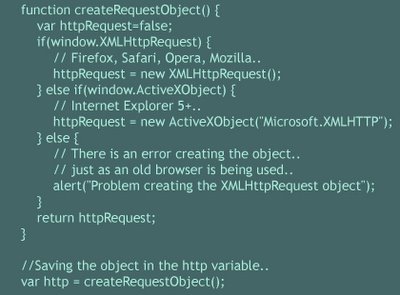
First, we need to know how to create an XMLHTTPRequest object. The process differs slightly depending on whether you are using Internet Explorer (5+) with ActiveX enabled, or a standards-compliant browser such as Mozilla Firefox.

Second, we need to write an event handler which will be called via some event on our user's page, and will handle sending our request for data to our server.

The event handler will use various methods of our XMLHTTPRequest object to:
-- Make the request to the server..
-- Check when the server says that it has completed the request..
-- Deal with the information returned by the server..

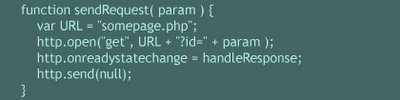
We can make our request of the server by using a GET method to an appropriate server-side script. Here's an example event handler called sendRequest which assumes that we have created our XMLHTTPRequest object and called it http:

Note that the function listens to the onreadystatechange property of the XMLHTTPRequest object and, each time this parameter changes, calls a further function handleResponse..

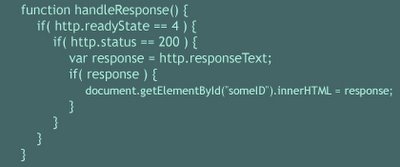
Third, then, we need to write a function handleResponse which will establish when the server has completed our request, and do something useful with the data it has returned:

Note here that our function checks for a readyState value of 4 - there are various numbered states describing the progress of such a request, but we are only interested in the value of 4, which indicates that the request is complete and we can use the returned data.

Also we check that a successful server response was received.. that's 200..

In this case, we have received our information as simple text via the responseText property of our XMLHTTPRequest object. Information can, however, be returned as XML or as properties of a predefined javascript object, though this is perhaps beyond the scope of this tutorial.

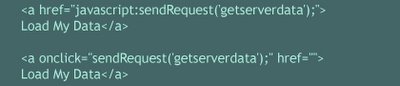
This creates a request object along with a send request and handle response function. So to actually use it, you could include the previous JavaScript functions in your page. Then to make one of these backend requests you would tie it to something. Like an onclick event or a straight href like this:

That means that when someone clicks on that link what actually happens is that a backend request to
( somepage.php?id=getserverdata ) will be sent.

Now, let's get to the server-side part "somepage.php", you might have something like this:

Now, look at handleResponse. It assigns the string returned by the server "Hello AJAX World" to the ID named someID using DOM..
That means if you have a DIV tag like this in your page:

Once you click on that link, that will dynamically be changed to:

That's all there is to it. Everything else is just building on top of this. Replacing the simple response "Hello AJAX World" syntax with a richer XML format and making the request much more complicated as well. Before you blindly install large "AJAX" libraries, have a go at rolling your own functionality so you know exactly how it works and you only make it as complicated as you need. Often you don't need much more than what is shown here.

<.adjuster />

Friday, April 14, 2006

Where To Use AJAX

It's been well over a year now since GMail changed the way everyone thought about web applications.
Here are places Ajax should now be required in a web application:

Form driven interaction
Forms are slow. Very slow. Editing a tag on a del.icio.us bookmark? Click on the edit link to load the edit bookmark form page, then edit the field and hit submit to wait for the submission to go through, then return to the previous page and scroll down to find the bookmark to see if the tags look right..

But with Ajax? Click on the edit link to instantly start changing tags, click on the submit button to asynchronously send off changes to the tags and quickly see in place what changed, no reloading the entire page..

Deep hierarchical tree navigation
First of all, applications with deep hierarchical tree navigation are generally a nightmare. Simple flat topologies and search/tagging works very well in most circumstances. But if an application really calls for it, use Javascript to manage the topology UI, and Ajax to lessen the burden on the server by lazy loading deep hierarchy data. For example: it's way too time consuming to read discussion threads by clicking through and loading completely new pages to see a one line response..

Rapid user-to-user communication
In a message posting application that creates immediate discussions between people, what really sucks is forcing the user to refresh the page over and over to see a reply. Replies should be instant, users shouldn't have to obsessively refresh. Even GMail, which improves on the old hotmail/yahoo mail 'refresh inbox, refresh inbox' symptom, doesn't really push Ajax far enough yet in terms of notifying new mail instantly..

Voting, Yes/No boxes, Ratings submissions
It's really too bad there are no consistent UI cues for Ajax submission, because submitting a vote or a yes/no response is so much less painful when the submission is handled through Ajax. By reducing the time and impact of clicking on things, Ajax applications become a lot more interactive - if it takes a 40 seconds to register a vote, most people would probably pass unless they really care. If it takes 1 second to vote, a much larger percentage of people are likely to vote. (Sample:Movie ratings are 2008 on Netflix versus 210 ratings on IMDb.com)..

Filtering and involved data manipulation
Applying a filter, sorting by date, sorting by date and name, toggling on and off filters, etc. Any highly interactive data manipulation should really be done in Javascript instead of through a series of server requests. Finding and manipulating a lot of data is hard enough without waiting 30 seconds between each change in views, Ajax can really speed this up..

Commonly entered text hints/autocompletion
Entering the same text phrases or predictable text phrases is something software/javascript can be good at helping out with. It's very useful in del.icio.us and GMail, for quickly adding tags/email addresses..

--------------------------------------------------------------

Where you shouldn't use AJAX:

Simple forms
Even though forms are the single biggest beneficiary of Ajaxification, a simple comment form, or submit order form, or other one-off rarely used form does not benefit from Ajax driven submission. Generally, if a form is not used much, or it's critical to work properly, Ajax is not that helpful..

Search
LiveSearch on blogs is more annoying than useful. There's a reason that Google Suggest is staying in beta and not going on the front page of Google. Searching on Start.com Live.com doesn't allow use of the back button to see a previous search, or previous pages. Maybe it's possible that no one has gotten this right yet, but getting this right is hard enough that it's generally not a good idea, or more trouble that it's worth..

Basic navigation
In general, driving basic site/application navigation using Ajax is an awful idea. Why would anyone want to spend time writing code to emulate the browser behavior when they could spend time making their application better? For basic navigating between documents, Javascript doesn't help..

Replacing a large amount of text
Ajax saves a complete refresh of the page, so small pieces of the page can be more dynamically updated. But if nearly everything on a page is changing, why not just request a new page from the server?

Display manipulation
Even though it seems that Ajax is purely a UI technology, it's not. It's actually a data synchronization, manipulation and transfer technology. For maintainable and clean web applications, it's a good idea not to have Ajax/Javascript manipulate the interface directly at all. Javascript can stay separate and simply manipulate the XHTML/HTML DOM, with CSS rules dictating how the UI displays that data..

Useless widgets
Sliders, drag and drops, bouncies, mouse gestures, whatever. Mostly these widgets can be replaced with more intuitive controls, or eliminated altogether in favor of simplicity. In picking colors, maybe a slider widget is useful to pick the exact shade. But in picking a price point in a store, a slider to pick the price to the cent is just overkill..

<.adjuster />

Wednesday, April 12, 2006

AJAX Mistakes

Ajax is an awesome technology that is driving a new generation of web apps. But Ajax is also a dangerous technology for web developers, its power introduces a huge amount of UI problems as well as server side state problems and server load problems.

This's a list of the many mistakes developers using Ajax often make:

Using Ajax for the sake of Ajax
Sure Ajax is cool, and developers love to play with cool technology, but Ajax is a tool not a toy. A lot of the new Ajax applications are really just little toys, not developed for any real purpose, just experiments in what Ajax can do or trying to fit Ajax somewhere where it isn’t needed. Toys might be fun for a little while, but toys are not useful applications..

Breaking the back button
The back button is a great feature of the standard web site user interface. Unfortunately, the back button doesn’t mesh very well with Javascript..

Not giving immediate visual cues for clicking widgets
If something I’m clicking on is triggering Ajax actions, you have to give me a visual cue that something is going on. An example of this is GMail. Whenever I do something in GMail, a little red box in the top right indicates that the page is loading..

Leaving offline people behind
With this new breed of Ajax applications, people who have spotty internet connections or people who just don’t want to switch to the web need to be accomodated as well. Just because technology ‘advances’ doesn’t mean that people are ready and willing to go with it. Web application design should at least consider offline access. With GMail it’s POP, Backpackit has SMS integration. In the Enterprise, it’s web-services..

Sending sensitive information in the clear
The security of AJAX applications is subject to the same rules as any web application, except that once you can talk asynchronously to the server, you may tend to write code that is a very chatty in a potentially insecure way. All traffic must be vetted to make sure security is not compromised..

Assuming AJAX development is single platform development
Ajax development is multi-platform development. Ajax code will run on IE’s javascript engine, Spidermonkey (Mozilla’s js engine), Rhino (a Java js implementation, also from Mozilla), or other minor engines that may grow into major engines. So it’s not enough just to code to JavaScript standards, there needs to be real-world thorough testing as well..

Too much code makes the browser slow
Ajax introduces a way to make much more interesting javascript applications, unfortunately interesting often means more code running. More code running means more work for the browser, which means that for some javascript intensive websites, especially inefficiently coded ones, you need to have a powerful CPU to keep the functionality zippy..

Not having a plan for those who do not enable or have JavaScript
According to the W3 schools browser usage statistics, which if anything are skewed towards advanced browsers, 11% of all visitors don’t have JavaScript. So if your web application is wholly dependent on JavaScript, it would seem that you have potentially cut near 10% of your audience..

Not using links I can pass to friends or bookmark
Another great feature of websites is that I can pass URLs to other people and they can see the same thing that I’m seeing. I can also bookmark an index into my site navigation and come back to it later. Javascript, and thus Ajax applications, can cause huge problems for this model of use. Since the Javascript is dynamically generating the page instead of the server, the URL is cut out of the loop and can no longer be used as an index into navigation. This is a very unfortunate feature to lose, many Ajax webapps thoughtfully include specially constructed permalinks for this exact reason..

Inventing new UI conventions
Using complex logic in the page design such as ‘click on this non obvious thing to drive this other non obvious result’ will increase the time and difficulty of learning the aplication, which is a major negative for any application..

Blocking Spidering
Ajax applications that load large amounts of text without a reload can cause a big problem for search engines. This goes back to the URL problem. If users can come in through search engines, the text of the application needs to be somewhat static so that the spiders can read it..

Character Sets
One big problem with using AJAX is the lack of support for character sets. You should always set the content character set on the server-side as well as encoding any data sent by Javascript. Use ISO-8859-1 if you use plain english, or UTF-8 if you use special characters, like æ, ø and å (danish special characters) Note: it is usually a good idea to go with utf-8 nowadays as it supports many languages)..

Changing state with links (GET requests)
The majority of Ajax applications tend to just use the GET method when working with AJAX. However, the W3C standards state that GET should only be used for retrieving data, and POST should only be used for setting data. Although there might be no noticable difference to the end user, these standards should still be followed to avoid problems with robots or programs such as Google Web Accelerator..

Problem reporting
In a traditional server-side application, you have visibility into every exception, you can log all interesting events and benchmarks, and you can even record and view (if you wish) the actual HTML that the browser is rendering. With client-side applications, you may have no idea that something has gone wrong if you don’t know how to code correctly and log exceptions from the remotely called pages to your database..

Return on Investment
Sometimes AJAX can impressibly improve the usability of an application (a great example is the star-rating feedback on Netflix), but more often you see examples of expensive rich-client applications that were no better than the plain HTML versions..

<.adjuster />

Sunday, April 02, 2006

What Is AJAX?

Asynchronous JavaScript and XML (AJAX) is not a technology in itself, but is a technique for creating interactive web applications. When using AJAX, Web applications are able to make quick, incremental updates to the user interface without reloading the entire browser page. This makes the application faster and more responsive to user actions. This is meant to increase the Web page's interactivity, speed, and usability.

Ajax is a term that refers to the use of a group of technologies together:
XHTML (or HTML), CSS, DOM, JavaScript, XML, XMLHttpRequest object.

- XHTML (or HTML), CSS, for marking up and styling information.
- The DOM accessed with a client-side scripting language, like JavaScript or JScript, to dynamically display and interact with the information presented.
- The XMLHttpRequest object to exchange data asynchronously with the web server.
- XML is commonly used as the format for transferring data back from the server.

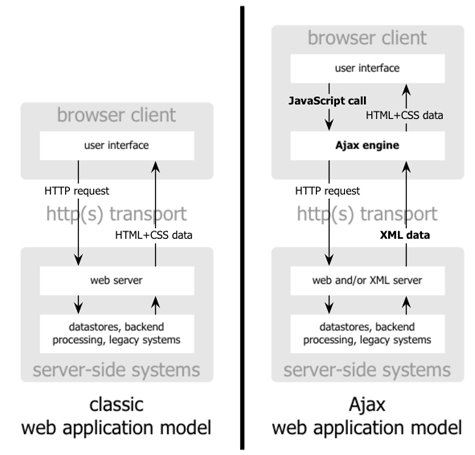
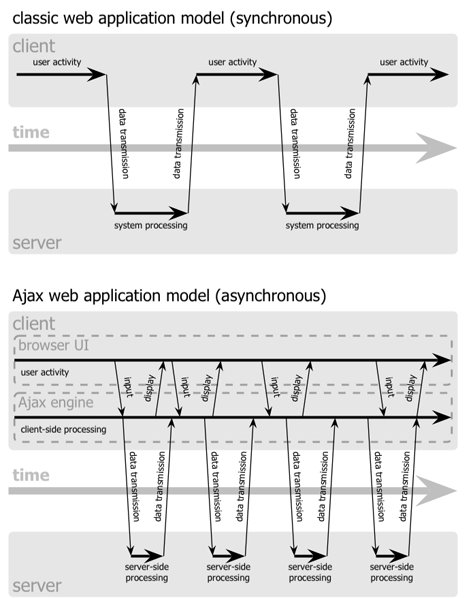
Classic web application model compared to ajax web application model
The classic web application model works like this: Most user actions in the interface trigger an HTTP request back to a web server. The server does some processing (retrieving data, crunching numbers, talking to various legacy systems) and then returns an HTML page to the client. It’s a model adapted from the Web’s original use as a hypertext medium.

This approach makes a lot of technical sense, but it doesn’t make for a great user experience. While the server is doing its thing, what’s the user doing? That’s right, waiting. And at every step in a task, the user waits some more.

Obviously, if the Web is designed from scratch for applications, users will not wait around. Once an interface is loaded, why should the user interaction come to a halt every time the application needs something from the server? In fact, why should the user see the application go to the server at all?

An Ajax application eliminates the start-stop-start-stop nature of interaction on the Web by introducing an intermediary (an Ajax engine) between the user and the server.

Instead of loading a webpage, at the start of the session, the browser loads an Ajax engine, this engine is responsible for both rendering the interface the user sees and communicating with the server on the user’s behalf. So the user is never staring at a blank browser window and an hourglass icon, waiting around for the server to do something.

Classic web application model compared to ajax web application model
Every user action that normally would generate an HTTP request takes the form of a JavaScript call to the Ajax engine instead. Any response to a user action that doesn’t require a trip back to the server (such as simple data validation, editing data in memory, and even some navigation) the engine handles on its own. If the engine needs something from the server in order to respond (submitting data for processing, loading additional interface code, or retrieving new data) the engine makes those requests asynchronously, usually using XML.

Who’s Using Ajax:
All of the major products Google has introduced over the last year [Google is making a huge investment in developing the Ajax approach].
Flickr, A9, Netvibes, del.icio.us, meebo, Remember The Milk..
and alot more of Web 2.0 sites..

These projects demonstrate that Ajax is not only technically sound, but also practical for real-world applications. This isn’t another technology that only works in a laboratory. And Ajax applications can be any size, from the very simple, single-function [Google Suggest] to the very complex and sophisticated [Google Maps].

The biggest challenges in creating Ajax applications are not technical. The core Ajax technologies are mature, stable, and well understood. Instead, the challenges are for the designers of these applications: to forget what we think we know about the limitations of the Web, and begin to imagine a wider, richer range of possibilities.

It’s going to be fun.

<.adjuster />

Wednesday, March 29, 2006

Netvibes is the best Web 2.0 Start Page

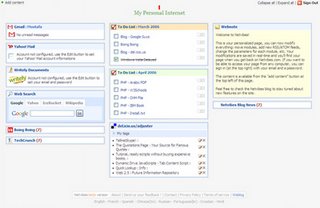
NetvibesThe aim of it is to provide a place on the internet where you can set just the content you like, a super easy way of building your personalized homepage, available anywhere, anytime. No registration is needed, however if you want to access your page from another computer you'll be able to do it by registering with your email address and a password..

Netvibes is a web-app based on the idea of personalized homepages..
it is powered by some nicely developed Ajax..

Netvibes can be considered as a personal news aggregator with RSS and Atom support. Comes with a set of predefined news feeds..

Netvibes is developed by a french team who are excited about what the web can be..

Netvibes is fully localized, available for now in English, French, German, Spanish, Portuguese and Chinese..

Netvibes was launched on the 8th September 2005..

Netvibes Customized Start Page
The project itself looks pretty good: modules are intuitive and the page interaction’s easy to catch up on with just a few seconds. There are a few other things on the slate too, apparently, like modules for Flickr, feed searching, bookmarks, etc..

All in all, while it is another solution for a problem that many people are tackling, Netvibes looks like a pretty good Ajax-based homepage, so you should definitely check it out and take your conclusions..

U can read alot of newly added features to Netvibes on their blog @
http://blog.netvibes.com/

<.adjuster />

Tuesday, March 28, 2006

Windows Vista Delayed Again

Vista DelayedThe new version of Microsoft Windows, called Vista, is now delayed..
it was originally going to ship in 2003. Then 2005. Then 2006. Now in early 2007 [January]. I'm not surprised!

Micro$oft says the delay is for the need to make more security and usuability tweaks..

Office 2007 launch delayed too to meet Vista!!

A quote from retiring Windows co-president Jim Allchin:
"We won't compromise on product quality, and we needed just a few more weeks."

The few more weeks changed to few more months!
After the delay i prefer to think Vista this way..
Windows Vista: Too Much Marketing, Not Enough Coding..

Windows VistaWindows Vista

So what's new in this Vista?
Windows Vista will include whole new stuff such as:
1. Anti-spyware tools.
2. Internet Explorer 7.
3. Better home networking.
4. Windows Media Player 11.
5. Windows Calendar [a new systemwide tool designed to do for datebook information what Outlook Express does for e-mail in Windows XP].
6. Broad IPv6 support.
7. Improved client-side caching of data stored on a server.
8. Volume encryption.
9. Revamped synchronization engine.
10. Lots of new laptop features. with an auxiliary display.
11. Automatic hard drive optimization.
12. Security enhancements.
13. New searching mechanism.
14. Secure boot-up process that helps prevent someone from gaining access to your data if your PC is lost or stolen.
15. Parental controls.
16. There will also be visual changes.
and more..

How much will it cost?
Pricing has not been announced.

<.adjuster />

Wednesday, March 22, 2006

Is Skype Secure?

Is Skype Secure?We all know the advantages of Skype, but what about the disadvantages that we all don't know?

Is Skype secure? Is the program safe to use? Is Skype more secure than a telephone call made with an analog or ISDN telephone? How does the security of Skype compare with other VoIP-based systems?

Skype binds to three ports on the user's computer and directly manipulates Windows XP's built-in firewall to accommodate these network bindings..

Skype's file transfer function does not contain any built-in anti-virus protection that scans programs as they are downloaded..

Skype accesses the hard disk several times per minute..
Although those accesses are small, extremely fast and safe in the short term, they can be harmful in the long term..

Niklas Zennstrom, co-founder of Skype, has admitted that the current security model would not open-source:
Would he make Skype open-source? No, that would make its strong 1024 bit encryption and security vulnerable: "We could do it but only if we re-engineered the way it works and we don't have the time right now."

In cryptography and computer security, security through obscurity (sometimes security by obscurity) is a controversial principle in security engineering, which attempts to use secrecy (of design, implementation, etc.) to ensure security. A system relying on security through obscurity may have theoretical or actual security vulnerabilities, but its owners or designers believe that the flaws are not known, and that attackers are unlikely to find them..

A few people will give up a "normal" phone for a PC-linked Skype connection. New products, such as standard phone handsets with USB connectors, help blur the line separating Skype from the rest of the telephone world, but that line remains..

Is Skype's completely proprietary nature. Open source fans don't appreciate Skype's rejection of open source values and standards. Large companies don't appreciate Skype's way of worming through corporate firewalls..

Skype do not follow standards, two major computer-based phone products that do follow standards, SIPphone and FreeWorldDialup, have tiny market share compared to Skype but have the weight of internet standards on their side. Their limited market share will not threaten to overwhelm Skype but may grow large enough to push Skype to involvement with the standards community. That probably won't happen until at least 2008, and will likely depend on how Microsoft implements Voice over IP support in Windows Vista..

The integrity of the data, i.e. data modified while traveling though peers, even if encrypted, is unknown and undocumented..

Skype provides an uncontrolled registration system for users: registration requires no proof of the identity of the user at all. This works two ways: you can use the system without revealing your identity to other users of the system, but on the other hand you have no guarantees that the person you communicate with is the one they say they are..

Skype is a proprietary software program using undocumented protocols, and laws prohibit reverse-engineering it..

Skype implements some kind of "peer-to-peer" network over client machines, with clients on fast connections becoming major exchange points; since research centers typically have very high speed connections, machines running Skype in those centers may generate very high traffic; some networks were reportedly nearly saturated by Skype traffic..

The information flow implemented by Skype is unknown; though encryption is used, it is unknown where traffic goes..

Skype claims that its system uses the RSA encryption algorithm for key exchange and 256-bit AES as its bulk encryption algorithm. However, Skype does not publish its key exchange algorithm or its over-the-wire protocol and, despite repeated requests, refused to explain the underlying design of its certificates, is authentication system, or its encryption implementation. Therefore it is impossible to validate the company's claims regarding encryption. It is entirely possible that the data is both encrypted and not secure..

Skype could also be an infection vector for spyware. Although the program's creators promise that their program does not come with spyware or adware, it is possible that they are not being truthful or that their policy will change in the future. Skype could have security vulnerabilities that a third-party could exploit..

Finally, it must be remembered that the security of the Skype system also depends entirely on the good will of Skype’s programmers and the organization running Skype’s back-end servers. It is possible that there are back doors in the system allowing the Skype organization or others to record Skype conversations, turn on a computer's microphone and record the room's noise..

<.adjuster />

Sunday, March 19, 2006

Skype! Free Internet Calls

SkypeSkype lets you make free calls over the internet to anyone else who also has Skype. It's free and easy to download and use, and it works with most computers. Skype offers free global telephony and unlimited voice calls with its next-generation peer-to-peer software.
Users may call landlines and cellphones for a fee; users may call each other for free.
Skype makes your computer (or PocketPC) works as your phone.

Skype users now are near to 272 million people worldwide..


Skype works on a decentralized model, meaning there are no big phone switches and controlling computers in regional data centers, such as those that power Vonage and other broadband phone service providers. The only centralized Skype services at the beginning were the login servers, which also show which other Skype users are online. The switches that followed control SkypeOut calls to traditional telephone networks around the world. Adding Skype Voicemail and SkypeIn requires more centralized resources, and Skype data centers are growing as you read this. But Skype's low infrastructure cost per number of subscribers creates jealousy among every other broadband phone service provider.

Other internet telephony services, such as Vonage, Verizon, Packet8, ATT CallVantage, and others, spend hundreds of dollars of marketing and advertising money to find each new customer. Skype spends nothing [$0] except for the server support to keep its download files available.. Users worldwide join Skype by a word of mouth..

Skype transmits the full frequency range of human hearing (20Hz to 20KHz). Compare this with the standard phone frequency of 300Hz to 3.4KHz and you can see why Skype calls sound so wonderful.

The hassle could be your computer must be turned on to use Skype, and people you call must have Skype running on their system in order to receive your call.

PROs:
-- Every Skype connection uses 256-bit encryption
-- Call quality astounds people
-- Talking free to other Skype users
-- Conference call with up to 5 total Skype users
-- File transfers
-- Chat (instant messaging)
-- SkypeOut [The ability to call regular phones]
-- SkypeIn [The ability of regular phones to call you on Skype]
-- Skype Voicemail
-- Skype Video Calling

Skype may not take over the world. However, Skype makes the world's highest-quality phone connections available for the world's lowest price: free.

The main difference between Skype and other VoIP clients is that it operates on a peer-to-peer model rather than the more traditional server-client model. The Skype user directory is entirely decentralised and distributed among the nodes in the network, which means the network can scale very easily to large sizes (currently just over 70 million users) without a complex and costly centralised infrastructure.


Try Skype now!


For now, Skype looks so wonderful, but to me and other developers, it still needs alot of criticism for security.. specially in large scale use like researches and large companies..

Security in Skype has alot of red marks which will be discussed in the next part..

<.adjuster />

Wednesday, March 15, 2006

The Million Dollar Homepage

The Million Dollar Homepage The idea is to sell 1 pixel on the screen for 1$..
You can buy 1 box minimum for $100 (100 pixels = 10x10 pixels), and the maximum purchase is whatever is left..
And it's doing the job very well : about 450000 pixels sold in just 2 months..

The idea started 26th August 2005 and now is sold out!

The owner is Alex Tew, 21 years old, the UK student behind the site.. He sells pixels on a web page to fund his way through university..

The site and homepage will be online for at least 5 years.. at least until 26th August 2010..

He says to buyers "You will have a piece of internet history!"

So why should people buy Alex pixels?
Because every buyer will have an image and a link to his site on the homepage of a site that could potentially be seen by millions of people over the coming years. The site will be online for at least 5 years, that's guaranteed, but the idea is to keep it online forever..

All you need to make money on the Internet is one really good idea.

Site: http://www.milliondollarhomepage.com/

<.adjuster />

Tuesday, March 14, 2006

Google Mars is here

Google Mars
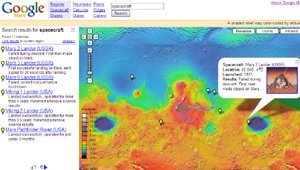
Google is now showing you maps of the Mars. This feels just like Google Maps for earth. You can switch between three different map types; elevation, visible, and infrared. A list of "links of interest" (like where spacecrafts landed), as well as named mountains, canyons, dunes and craters is also available.

Google in their Mars FAQ says they're working on a version of this Mars data to be used in Google Earth (desktop) clients.

Links:
Google Mars
http://www.google.com/mars/

About Google Mars
http://www.google.com/mars/about.html

<.adjuster />

Wednesday, March 08, 2006

Switching to Gmail

Switch to GMail todaySwitching to a new email address can be a pain, but it doesn't have to be. To get personalized help on how to switch to Gmail, enter the
domain for the email address you no longer want to use, and click "Help Me Switch". Or view general instructions on switching from any
email address. Change is good. It can be easy too.

While I was doing some work this weekend I came what appears to be a new "guide" from Google that's designed to assist users of other
email services in a switch to Gmail. Yes, more good marketing from Mountain View.

The "Switching to Gmail" guide is a set of pages where, after the user enters their current, non-Gmail address (note that they use Yahoo
Mail and Hotmail in an example), they receive a customized guide (based on the current service) to switch to the still beta, Gmail.

Switch to GMail from other email services - Just enter the domain for the email address you no longer want to use, and click "Help Me
Switch". Contains detailed information on migrating to GMail from Yahoo, Hotmail, SBCGlobal, Comcast and .EDU addresses.

Switch from any email provider:
http://mail.google.com/support/bin/static.py?page=switchguide.html&switch=1

<.adjuster />

Monday, February 27, 2006

Google Page Creator

Google Page Creator Want to create an online photo tour of your vacation to Bali? An overview of the South American precipitation cycle for your science class? A shrine to your pet ferret?

Now's your chance. We're testing a new product that makes creating your own web pages as easy as creating a document in a word processor. Google Page Creator is a free tool that lets you create web pages right in your browser and publish them to the web with one click. There's no software to download and no web designer to hire. The pages you create are hosted on Google servers and are available at http://yourgmailusername.googlepages.com for the world to see.

http://pages.google.com
A new web address u will remember for good..

Links
About Google Page Creator
http://pages.google.com/-/about.html

Sign up for Page Creator updates mailing list
http://pages.google.com/-/updates.html

Page Creator Help
http://www.google.com/support/pages

Page Creator Google Group [484 members and counting]
http://groups.google.com/group/Google-Page-Creator

<.adjuster />

Monday, February 20, 2006

RSS On My Blog = Correct

Some folks ask me alot if i have RSS feed for my blog..
and i say:
"Yes, sure i have.."

To subscribe to my feed just click the orange radar icon on the sidebar, u'll be redirected to my FeedBurner feed page,
there u can subscribe using 2 different ways:

** Desktop Client:


As u see, there's alot of programs to use it to subscribe, but i recommend FeedDemon, it's good and easy..
just select the reader program u like from the menu, and it will open automatically and add my feed to ur list of feeds..
[the reader u select should be installed on ur computer first ofcourse]

------------------------------------------------------
** Online Service:


Here once an icon has been clicked, u'll be redirected to an online reader service, u should register[create account] or login there..
then u'll add my feed to ur collection..
u have a group of options to select from, feel free to make a choice..

<.adjuster />

Saturday, February 18, 2006

RSS: Web Syndication Part 2

You may want to read Part 1 first

What is Atom?
Atom is a format quite similar to RSS. It was created by people who felt that RSS could be improved upon, and some that disagreed with some of the politics regarding RSS. Some people are heavily involved in the (quite unimportant, in my opinion) argument as to which format is better. The Atom format is in development. The basic difference is that while Atom is somewhat more complex, it is also able to carry more complex information, and it is consistent across the syndication, storage, and editing of information. Just about everything on this page which discusses RSS applies equally well to Atom. You can learn more about Atom at the official website, AtomEnabled.org.

What is OPML?
OPML is an XML format for outlines. You can read more about it on the OPML website. An OPML file can be made that lists all the RSS feeds you subscribe to, and this can be very useful. Many RSS aggregators can produce (export) OPML files, and many can read (import from) them. This is a very useful feature. Suppose that you are using aggregator ABC to read 50 RSS feeds. Your friend tells you that aggregator XYZ is so much better than ABC, so you want to try it out. Rather than re-subscribing to all 50 feeds from XYZ, you can export an OPML file from ABC, and import that file into XYZ, assuming that both aggregators have these features. Many people put their OPML files online, which would allow you to instantly to subscribe to all the feeds that they read. Share Your OPML is one website that makes use of information from many people’s OPML files.

How do I read RSS Feeds?
If you want to collect and browse feeds you have many choices, but there are two primary categories of feed reading applications:
** Desktop Programs
** Online Services


**There are many desktop applications for Windows and Mac OS system users, but the most popular two are:
-- FeedDemon (Windows)
-- NetNewsWire (Mac OS X)

Both are top for ease of use.
For a reader of your choice; a search for "RSS Reader" at popular search sites will yield many results.

**If you would prefer to use an online service to track your feeds, you have the advantage of being able to access your feed updates anywhere you use a web browser. Also, any upgrades or new features are added automatically.

The trade-off comes in different, fewer features and slightly slower performance versus desktop programs.

There are many web-based feed reading services, but the most popular two are:
-- NewsGator.com
-- Bloglines.com


Glossary
-- RSS = Really Simple Syndication = Rich Site Summary = RDF Site Summary = who cares?
-- RSS file = RSS feed = RSS channel = feed = channel
- Atom = a format similar to RSS; like RSS the files may also be called feeds or channels
-- XML = eXtensible Markup Language = the format RSS is written in = important only because RSS may be labeled as XML
-- RDF = Resource Discovery Framework = the format of RSS version 1.0 = important only because RSS may be labeled as RDF
-- OPML = Outline Processor Markup Language = an XML format for outlines, which may be used as a way of listing many RSS feeds
-- My website is syndicated = My website produces an RSS feed
-- Scraping = When Joe makes an RSS feed for Bob’s website without telling Bob; the feed is called a scraped feed
-- blog = weblog = log on the web = a journal-type website, many of which produce RSS feeds
-- RSS reader = news reader = RSS aggregator = a program that can read RSS files

---------------------------------------------------

Must read links:
- RSS Tutorials
http://www.mnot.net/rss/tutorial/
http://www.faganfinder.com/search/rss.shtml

- OPML Info
http://www.opml.org/

- RSS 2.0 founder Dave Winer
http://www.userland.com/

- RSS Workshop: Publish and Syndicate Your News to the Web
http://www.rssgov.com/rssworkshop.html

- RSS 2.0 Specification at Harvard
http://blogs.law.harvard.edu/tech/rss

<.adjuster />

Thursday, February 16, 2006

RSS: Web Syndication Part 1

RSS RSS: The Web's Next Big Thing..
Hang on to your hats boys and girls, because your experience of the World Wide Web is about to change!

What is RSS?
"RSS" stands for Really Simple Syndication or Rich Site Summary.
RSS means to get latest updates on sites, blogs or news headlines as they released without going to the site and check it.

Think about all of the information that you access on the Web on a day-to-day basis; news headlines, search results, what’s new, job vacancies, and so forth. A large amount of this content can be thought of as a list.

Most people need to track a number of these lists, but it becomes difficult once there are more than a handful of sources. This is because they have to go to each page, load it, remember how it’s formatted, and find where they last left off in the list.

RSS is an XML-based format that allows the syndication of lists of hyperlinks, along with other information, or metadata, that helps viewers decide whether they want to follow the link.

To enable this, a Web site will make a feed, or channel, available, just like any other file or resource on the server. Once a feed is available, computers can regularly fetch the file to get the most recent items on the list. Most often, people will do this with an aggregator, a program that manages a number of lists and presents them in a single interface.

Feeds can also be used for other kinds of list-oriented information, such as syndicating the content itself (often weblogs) along with the links.

Web pages are getting smarter than they used to be. More of your favorite sites are making content summaries and updates available for syndication, just like the syndicated advice columns in your newspaper. Only this kind of syndication is free and "really simple." It is called "RSS" for "really simple syndication."

That means you can download a free or low-cost news feed reader[aggregator] and "subscribe" to a number of your favorite Web sites. You might have seen odd little orange "XML" rectangles on some sites. The URL when you click on the rectangle is the address of the news feed.

What is RSS News Aggregator?
A news aggregator is a software application or remotely hosted service that collects syndicated content from disparate sources and provides a single consolidated view. These applications can also be commonly referred to as a feed reader, feed aggregator or simply just an aggregator.

Why Use an RSS Aggregator?
For anyone that reads a half dozen or more pages that have RSS feeds, an aggregator is a necessity. RSS aggregators are set up to periodically check for new items in the feeds you are subscibed to, commonly once every hour. In other words, the news comes to you, rather than you having to go to the news. This saves a tremendous amount of time. Or conversely, you can read many more feeds in the same amount of time. Many people read several hundred feeds. That just wouldn't be feasible without an RSS aggregator. Additionally, you avoid all the non-new information on a web page, including the ads, menus, etc.

to be continued in part 2..

<.adjuster />

Wednesday, February 01, 2006

Reloading!

I'm very sorry for my absence the last 11 days..

i was very busy preparing my own site for launch..

as u all know i don't have any free time to prepare anything for me because of the freelance tasks, so, when i get time, i did my site..

i put my personal data and work experience in the site because it's not 100% personal, it's the platform to my online business..

My site URL: http://www.freewebs.com/adjuster/

after all, i didn't leave my blog w/o updates, i put a simple update in the sidebar to the right..
the update consists of new lists for:

** Web 2.0 featured services [changes when i find new leading-edge services] .

** Inside Google listing all of the information warehouses that Google is developing these days..

i digged thru these information especially for public benefit.. to pass & share Google thoughts to who is interested in Google..

<.adjuster />

Saturday, January 21, 2006

Why Microsoft is afraid of Google?

How do innovations at Google threaten Microsoft?

Microsoft CEO Bill Gates says:
"Google Inc. is fierce competition for Microsoft Corp., but the software giant does not fear the race and plans to upgrade his search technology in the next six months."
and,
"We are not afraid of Google, but there is intense competition between us. Google is our main competitor, brilliant people work there, but Internet search engines are still in a terrible state compared to where they could be."

Gates says that he has respect for the people who work there, but search can still be made a lot better than what Google has already achieved.

Microsoft and Yahoo already have been investing heavily in search, hoping to narrow Google's lead in the field.
According to Nielsen/NetRatings survey for U.S search requests:
- 45% -- Google
- 23% -- Yahoo
- 12% -- Microsoft's MSN

Gates denied that Microsoft intends to acquire[buy] Google or other leading Internet companies.
ummmm, this means MS is thinking about it, but who told them that Google will even think about it?

But the central challenge to Microsoft goes beyond corporate reorganizations, Microsoft's success has been due in large part to its realization two decades ago that control of the operating system on personal computers would give it a great amount of leverage over PCs. Most companies in the 1980s saw the operating system as a pure commodity product, but Microsoft understood that it held the keys to the kingdom.. It's because of the dominance of the Windows operating system that Microsoft has been able to become so strong.. The dominance of Windows means that if you're a developer of a major software application, you need to deliver a product for Windows.. This means software developers must use the programming capabilities provided by Windows — its application programming interface, or API.

But many in the computer business have long believed that the core platform could be moved to a higher level, that technology gurus could establish a web-based platform that runs in the browser and is written in the language of the browser rather than the language of the operating system.. They work equally well on Windows, Mac or Linux, and that's bad news for Microsoft.

This was the dream of Marc Andreessen [co-founder of browser company Netscape Communications] and others back in the mid-1990s when Andreessen boasted that the web would reduce computer operating systems to nothing more than 'a poorly debugged set of device drivers' and this is why Microsoft responded so aggressively to the threat of Netscape after Bill Gates issued his famous memo warning of an Internet 'tidal wave' that threatened Windows. Netscape didn't succeed. Microsoft managed to thwart Netscape's attempt to establish a new platform on the web.

Key points against Microsoft:
1. When a company takes years and years to come out with a new operating system, it's obvious there is a problem.
2. While [Bill and Co.] refuse to break up the company, they should. They are too big to be creative. They need a company for the operating system, another one for the Internet, and another one for application software.
3. Since they have Cash on Hand of about 37-billion, they should do their loyal stockholders a favor: Pay a quarterly dividend.

Who's Afraid of Google? Everyone
It seems no one is safe: Google is doing Wi-Fi; Google is searching inside books; Google has a plan for ecommerce.

Google is turning the internet to an operating system, which drives Microsoft crazy and embarrassed, see the following:
Signs of panic inside MS: When one of Microsoft's key operating system engineers defected to Google last year, Microsoft CEO Steve Ballmer threw a chair across an office and vowed to kill Google.

The migration of applications from PCs to the Net is already happening - and it's key to Google's future. But the likelihood of a Google OS depends on what Microsoft accomplishes with its new OS, Vista.

The computer industry is a mature industry. In the developed world, virtually everyone has a computer. So Microsoft, to continue growing, needs to find new ways to expand its market, which is why they want to get into games, wireless and business-software markets. In these areas they're generating substantial losses. To the extent that Google becomes a dominant player in the Internet market, it blocks an opportunity for Microsoft to expand.

Why Microsoft and other giants are afraid of Google's ever-expanding agenda:
http://www.wired.com/wired/archive/13.12/google.html

Monday, January 16, 2006

MDC06 has been declared

After alot of digging around for info conerning the MDC06, i got the following data:

** MDC 2006:
Where: Cairo International Conference Center - Nasr City - Cairo - Egypt
When: 5-8 February 2006

as we all see, MDC location has chenged from Air Forces House!

LE 50:
but there's bad news in this MDC!, u will pay LE 50 for ur ID!
u'll register by mail and then @ 5 February u'll pay the LE 50.

i don't know why Microsoft is imposing a fee, do they really need money! maybe they r homeless now, or will take this money and try to Kill Google!!!! hahaha

they say on the site:
"A great value: For 50 EGP you’ll get your MDC 2006 ID that gets you into a lot of break-out sessions, interactive labs, MDC Gifts, and much, much more."

well, it seems that they r going to take a price for the GIFTS ;)

Meet u there folks, IF i decided to go!...

<.adjuster />

Google Search Techniques

Google search is NOT just typing the keyword and hit search.. it's far beyond this..
u can make very strong queries using Google search techniques..

such as:
Cached Links, Currency Conversion, Definitions, File Types, I'm Feeling Lucky, News Headlines, PhoneBook, Q&A, Results Prefetching, Search By Number, Similar Pages, Site Search, Spell Checker, Stock Quotes, Weather, Web Page Translation, Who Links To You..and alot more..

the real magic here is that u can do all of these very cool techniques from google's homepage!
YES, without navigating to extra pages inside..

see the complete list of awsome features @
http://www.google.com/help/features.html

<.adjuster />

Saturday, January 14, 2006

Blog events - Jan 13, 2006

Comming very soon in the blog:

1. RSS Feeds, so u can read new blog posts thru a RSS Reader, without even opening ur browser.

2. RSS, what's it, how to use it, how to create it on ur blogs and sites.

3. Web 2.0 siteList, a list dedicated to Web 2.0 services contains 50 sites with whole new ideas implementing Web 2.0 features.
[30 entries are in the list now and counting]

Be patient..

<.adjuster />

Wednesday, January 11, 2006

Web 2.0 - Dawn of the new internet

Web 2.0
Web 2.0 : It's like your brain on LSD!

This article is an attempt to clarify just what we mean by Web 2.0

The term was coined by Dale Dougherty of O'Reilly Media during a conference brainstorming session with MediaLive International.

In the initial brainstorming, they formulated the sense of Web 2.0 by example:
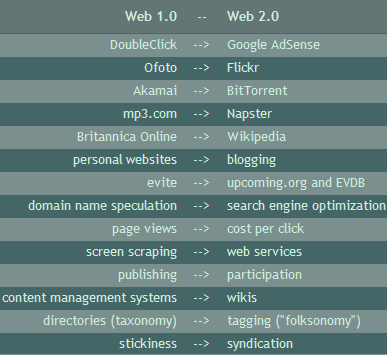
Web 1.0 compared to Web 2.0 Web 2.0 can also be defined as : Websites with rich user interfaces that behave more like desktop applications than a collection of interlinked pages to be read.

In the strictest sense, the term refers to several separate technologies that make Web sites faster and easier to use. If you've used Google's Gmail service, Yahoo's Flickr photo sharing site or Microsoft's Windows Live, you've seen Web 2.0 in action.

Wikipedia defines it as “a second phase of development of the World Wide Web”. However, there isn’t a consensus on its exact meaning. Web 2.0 loosely includes weblogs, wikis, linklogs, podcasts, RSS feeds and other forms of many-to-many publishing; social software, web APIs, web standards, web services and Ajax.
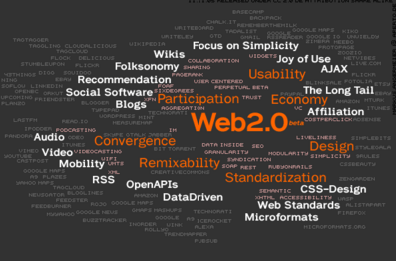
In Web 1.0, a small number of writers created Web pages for a large number of readers. As a result, people could get information by going directly to the source: Adobe.com for graphic design issues, Microsoft.com for Windows issues, and CNN.com for news. Over time, however, more and more people started writing content in addition to reading it. This had an interesting effect—suddenly there was too much information to keep up with! We did not have enough time for everyone who wanted our attention and visiting all sites with relevant content simply wasn’t possible. As personal publishing caught on and went mainstream, it became apparent that the Web 1.0 paradigm had to change.

Enter Web 2.0, a vision of the Web in which information is broken up into “microcontent” units that can be distributed over dozens of domains. The Web of documents has morphed into a Web of data. We are no longer just looking to the same old sources for information. Now we’re looking to a new set of tools to aggregate and remix microcontent in new and useful ways.

A big part of Web 2.0 is turning passive visitors and readers into active participants in producing the value that is offered by a website. If you’ve ever been addicted to a Web-based forum, then you know how powerful this can be. Web 2.0 is about taking that “power of community” and applying it to the Web as a whole.

The technology infrastructure of Web 2.0 is complex and evolving, but includes server software, content syndication, messaging protocols, standards-based browsers, and various client applications.

So if this is Web 2.0, what was its earlier avatar – Web 1.0?
The earlier avatar, that is Web 1.0, would be clearly demarcated content which was fairly static. You could not interact with it, add your comments or leave your mark. You used the software or the content as is and could not collaborate with other users of the same content.

By way of contrast. Back when it was happening, it was just ‘the web’ or the ‘dotcom era’.

Ashok Hingorani, CEO, Computact, (and an avid developer) takes it in his stride:
“Every product goes through the notorious Version 1 – the Net, Windows, etc. And they are always incomplete, buggy, with gaps. Above all, they designed with today’s technology in mind, and evolved rather than reengineered every few years. The Net is more than 15 years old. Its architecture does not take care of many things learned from hindsight, nor does it hande security/ privacy at all. You have to buy special software to do that.”

A website could be said to be built using Web 2.0 technologies if it featured a number of the following techniques:
- CSS, semantically valid XHTML markup, and Microformats
- Unobtrusive Rich Application techniques (such as Ajax)
- XUL (XML User interface Language)
- SVG (Scalable Vector Graphics)
- Syndication of data in RSS/Atom
- Aggregation of RSS/Atom data
- Clean and meaningful URLs
- Support posting to a weblog
- REST or XML Webservice APIs
- Some social networking aspects
- Javascript-based WinLIKE
- Java Web Start
- Flex/Laszlo/Flash

Let's summarize what we believe to be the core competencies of Web 2.0 companies:
- Services, not packaged software, with cost-effective scalability
- Control over unique, hard-to-recreate data sources that get richer as more people use them
- Trusting users as co-developers
- Harnessing collective intelligence
- Leveraging the long tail through customer self-service
- Software above the level of a single device
- Lightweight user interfaces, development models, AND business models

Web 2.0 is designed to be:
- Some Rights Reserved
- Cooperate, Don't Control
- Software delivered as a service thru the Web

Web 2.0 is after all not a product or object, not something we climb into or touch, but a concept that describes certain aspirations or internet tendencies.

Services such as Gmail, Google Maps, Flickr, del.icio.us, and the like may be expected to bear a "Beta" logo for years at a time.

Web 2.0 is white hot at the moment, and not just because of the hype, but because of the insane amount of stuff that's being built for it right now.

-----------------------------------
If u stuck with any term on this post, search for it using Google
More in-depth posts far beyond Web 2.0 are being prepared right now...

Useful Links:
- Oreilly - What's Web 2.0?
- Wikipedia.org Web_2.0 Definition
- Web 2.0 Workgroup
- Web 2.0 Conference

<.adjuster />

Happy Eid el-Adha for everyone

Today is Eid el-Adha el-Mobarak (Holiest Adha Feast)..

i wish all happiness & forgiveness to all Muslims in the entire Muslim community..

Happy Eid to everyone..

i went to the mosque for Eid prayers, then i spent a few good hours with my friends..

today i took the chance of celebrations and set aside (fixed) some of my problems with people as it's Eid and all of us should set aside their problems..

i wish happy Eid to all Muslims worldwide..

<.adjuster />

Sunday, January 01, 2006

Important Events

Finally and after alot of mess and surfing around, i've got the real times for the following events:

** Cairo International Book Festival:
Where: Cairo International Fairs Area - Nasr City - Cairo - Egypt
When: 19-29 January 2006

** Acitex:
Where: Cairo International Conference Center - Nasr City - Cairo - Egypt
When: 25-28 January 2006

** Cairo ICT:
Where: Cairo International Conference Center - Nasr City - Cairo - Egypt
When: 5-8 February 2006

** MDC 2006:
Where: Air Forces House - Salah Salem Rd. - Nasr City - Cairo - Egypt
When: Not yet set, But around 5 or 8 February 2006

I hope that MDC is determined soon because it's a BIG event u should NEVER miss!

Meet u there folks...

<.adjuster />